Serial communication protocols require additional configuration with the INTERFACE configuration panel.
Hardware Connections:
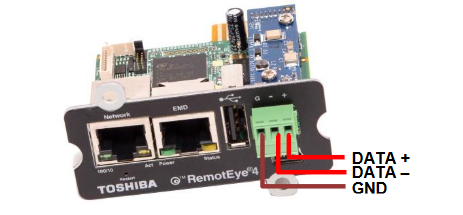
The RS-485 Signal range is:
Input voltage range: 0 to 5 Volts
Output voltage range: -7 to 12 Volts
Software Configurations:
1) On the home page dashboard, click on the "SETTINGS" menu at the top of the page. This will bring up the "SETTINGS" drop-down menu.
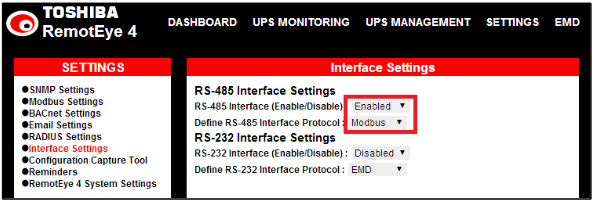
2) In the "SETTINGS" drop-down menu click on “Interface Settings” the selected entry text will turn RED.
2.1) If using RS-485
2.1.1) Under “RS-485 Interface Settings” set "RS-485 Interface (Enable/Disable)" to “Enabled”, and set "Define RS-485 Interface Protocol" to “Modbus”.
2.1.2) Under “RS-232 Interface Settings” set "RS-232 Interface (Enable/Disable)" to “Disabled”, and set "Define RS-232 Interface Protocol" to “Disabled”.
2.2) If using RS-232
2.2.1) Under “RS-232 Interface Settings” set "RS-232 Interface (Enable/Disable)" to “Disabled”, and set "Define RS-232 Interface Protocol" to “Modbus”.
2.2.2) Under “RS-485 Interface Settings” set "RS-485 Interface (Enable/Disable)" to “Enabled”, and set "Define RS-485 Interface Protocol" to “Enabled”.
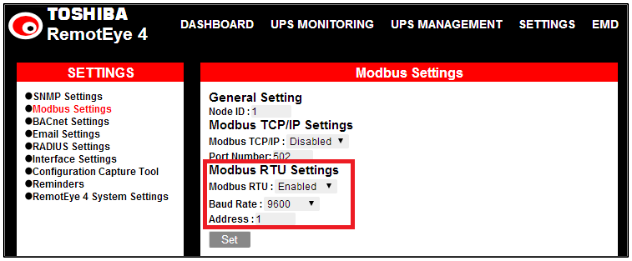
3) In the "SETTINGS" drop-down menu click on “Modbus Settings” the selected entry text will turn RED.
4) Look in the Protocol Settings Panel titled “Modbus Settings”. Under “Modbus RTU Settings”
4.1) set "Modbus RTU" to “Enabled”,
4.2) "Baud Rate" to the system baud rate (Default: 9600),
4.3) "Address" to the unit address (Default: 1).
5) Under “Modbus TCP/IP Settings” set "Modbus TCP/IP" to “Disabled”.
6) Click the "Set" button.
7) Configure the Connection Setup with master as follows:
7.1) Connection: Serial Port
7.2) Port Settings: Port 1, 9600 Baud, 8Data bits, Non Parity, 1 Stop bit
7.3) Mode: RTU
7.4) Slave ID: 1 (There can be from 1-247 Slave units, each with a unique ID, connected to each Master unit.)
8) Set the Read/Write Definition (E.g. the Read registers are 30001 – 30030)
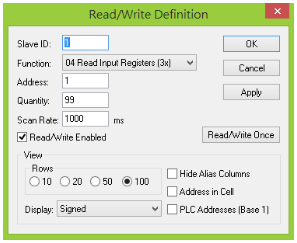
Example Read/Write setup
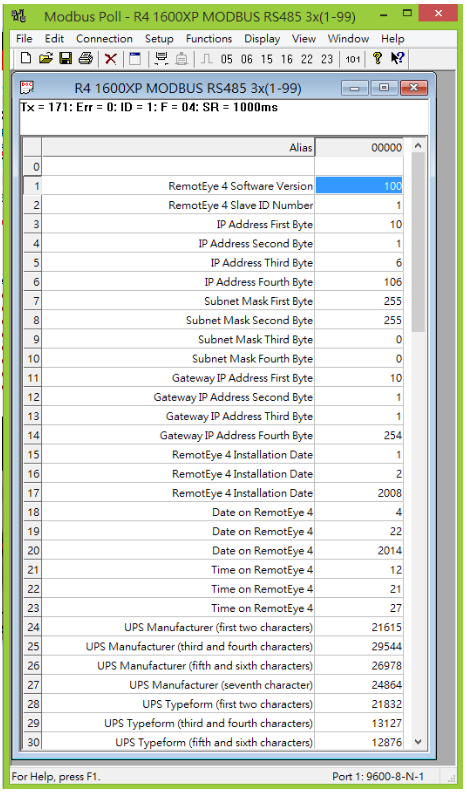
Example of Polled Data
|
Rate this Topic:
|
|||
|
